How do I create a cab pre-approval with Safe Pickup Mode?
To create a cab pre-approval with Safe Pickup Mode, please follow the steps below:
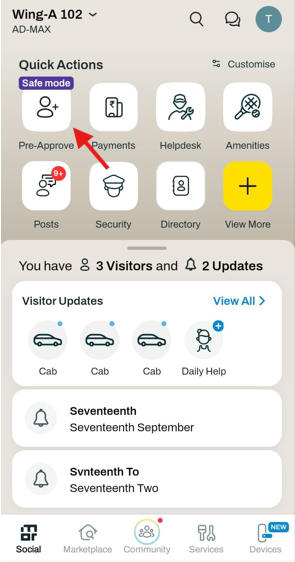
Click on the Pre-approve tile on the homepage
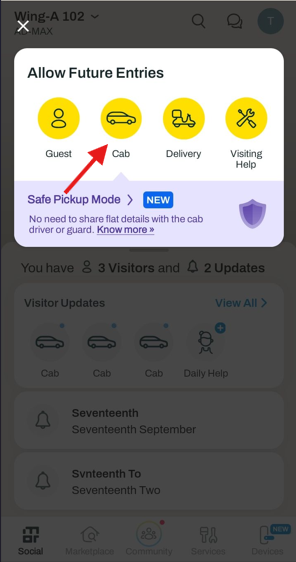
Select Cab
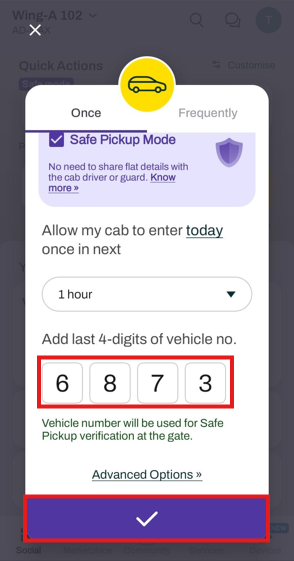
Click on the Safe Pickup Mode checkbox (you can also click Know More to understand the feature in detail)
Enter the last four digits of the vehicle number
Click Submit
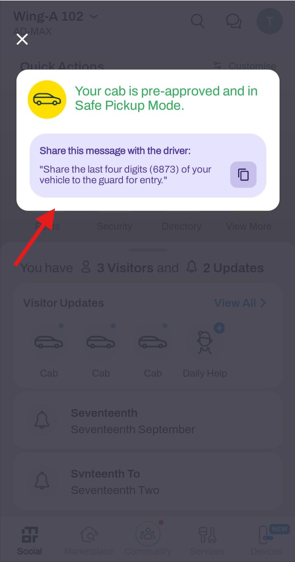
You will see a message saying “Your cab is pre-approved and in Safe Pickup Mode”, along with a copyable text that you can send to the driver.